Everything in One Place
A closer look at the core features that take you from raw recording to published stream, and everything in between.
Your Local Stream Library
The focus of Stream Manager is organization. For those who hoard their raw recordings (like me) or just want to quickly view and update online-only videos, the Streams library is the home base.
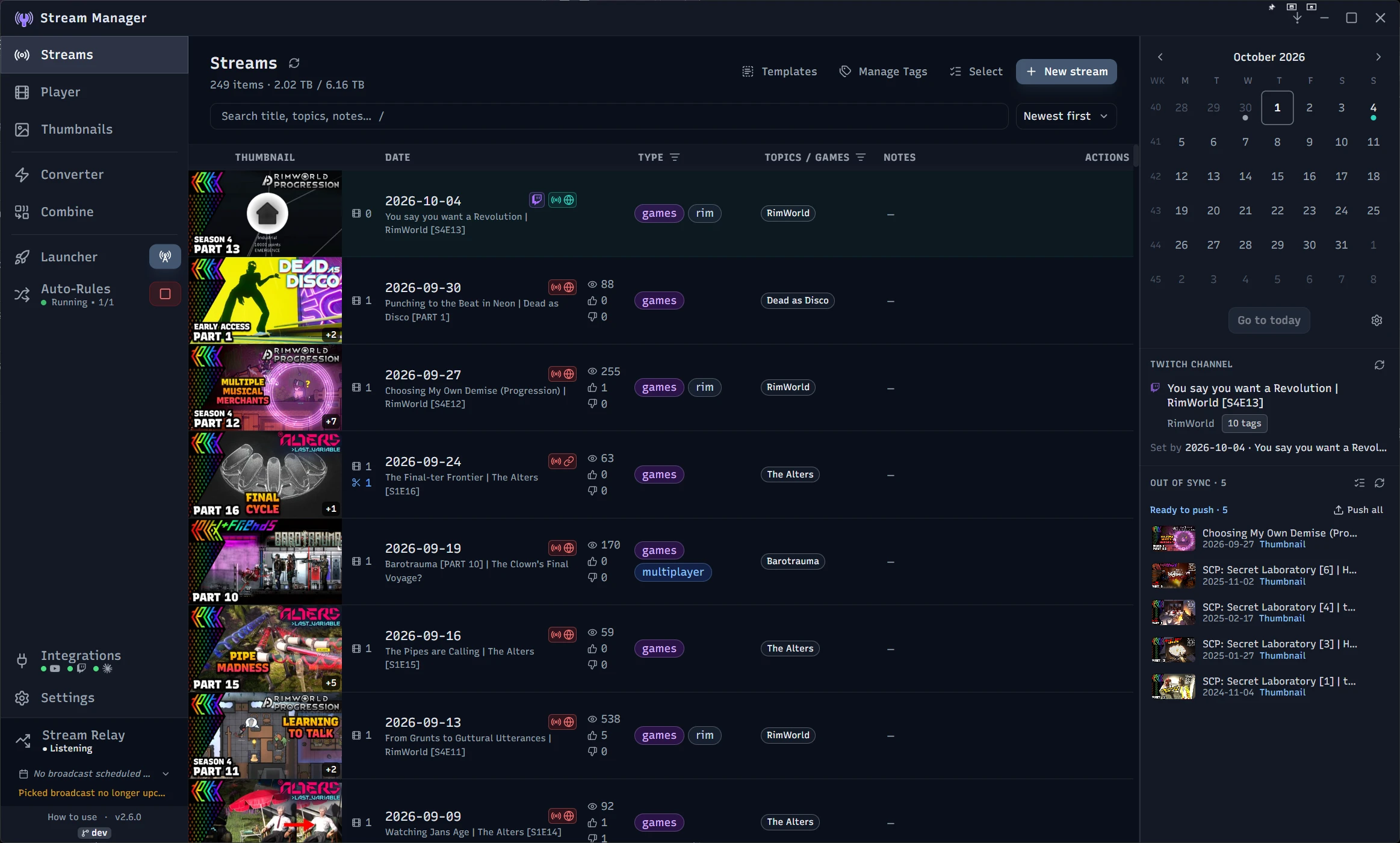
- YouTube and Twitch details sync: push your title, description, tags, thumbnail, and privacy to a linked broadcast or video, or pull changes made on YouTube Studio back to Stream Manager. Per-field indicators show exactly what is out of sync, so nothing changes behind your back.
- See how your videos are doing: linked YouTube videos show their views, likes, and dislikes right in the stream row, next to the date, and keep up on their own while you work.
- Tagging and metadata: add games, topics, stream type, and freeform comments to every stream item, so your library stays searchable and organized your way.
- Episode series tracking: group streams into seasons with auto-incrementing episode numbers, and clone a session as the next episode to carry its settings forward.
- Reusable templates: build titles, descriptions, and tags from merge fields, so one template keeps a whole series consistent.
- Import and bulk-link from YouTube: turn existing channel videos into stream items, complete with details and thumbnails, or match local folders to their YouTube videos by date.
- Drag files into Stream Manager: drop videos and images straight from File Explorer onto a stream item and they get filed where they belong (moved by default, copied if you hold Ctrl while dropping).
- Archive processing: compress older stream items with consistent encoding so the recording stays in your library at a fraction of the disk space.
Connect YouTube, Twitch, and Claude AI
Stream Manager connects directly to YouTube and Twitch via their APIs, so you can manage everything from inside the app. Claude integration is available to help generate titles, descriptions and tags.
YouTube
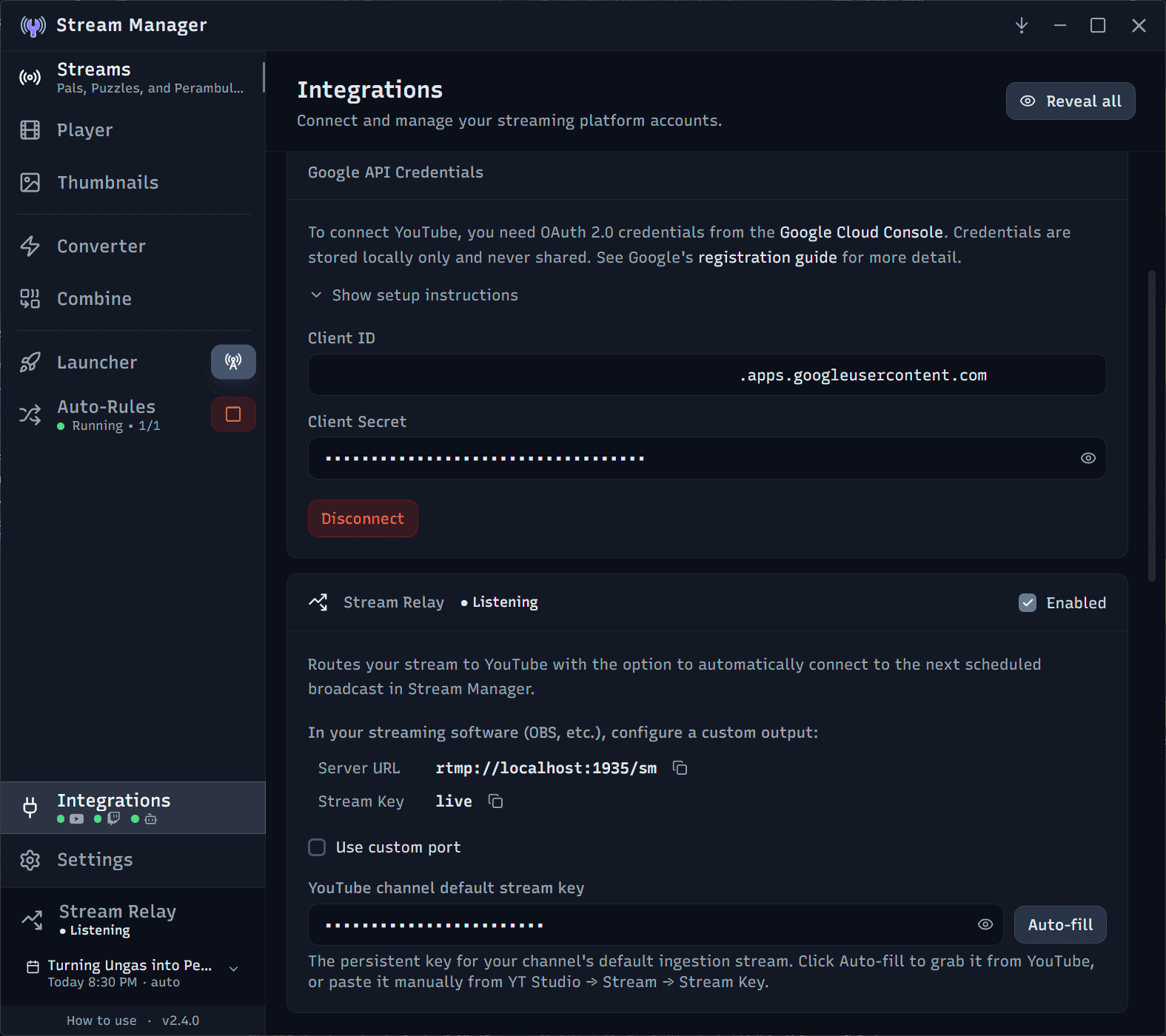
- Powers the big features: connecting YouTube drives the two-way metadata sync, import and bulk-link, and Stream Relay. Authorize once and the app refreshes your token automatically.
- Right now, connecting to YouTube requires your own Google Cloud project and OAuth 2.0 credentials. Instructions to do this are in the app under the "Integrations" page in the YouTube section.
- YouTube's API can't set a video's additional category details (such as the "Game Title" when the "Gaming" category is selected), or manage thumbnail and title A/B tests. Those can only be set and controlled in YouTube Studio. This is a YouTube API limitation, not a Stream Manager limitation.
Twitch
- Update as you go: push your Twitch channel title, category, and tags straight from a stream item, with a one-time authorization and automatic token refresh.
- Twitch's API only allows editing for the current stream, so there's no syncing past VODs after the fact. Go-live notifications can't be set from Stream Manager due to Twitch Helix API limitations.
Claude AI
- AI-assisted details: add your Anthropic API key to generate titles, descriptions, and tags with your choice of Claude model. Press Ctrl+Space while editing a field for inline suggestions.
- Your channel's voice: an optional system prompt gives the model standing instructions about your style and tone, set in the Integrations page. It is applied to every request.
- Your API key is stored locally and is never sent anywhere except Anthropic for connection validation and request processing.
Go Live Automatically with Stream Relay
Stream Relay lets the app sit between your encoder and YouTube. Point OBS at Stream Manager instead of YouTube, and it forwards your stream straight through while handling the broadcast for you, so you don't have to click around in YouTube Studio.
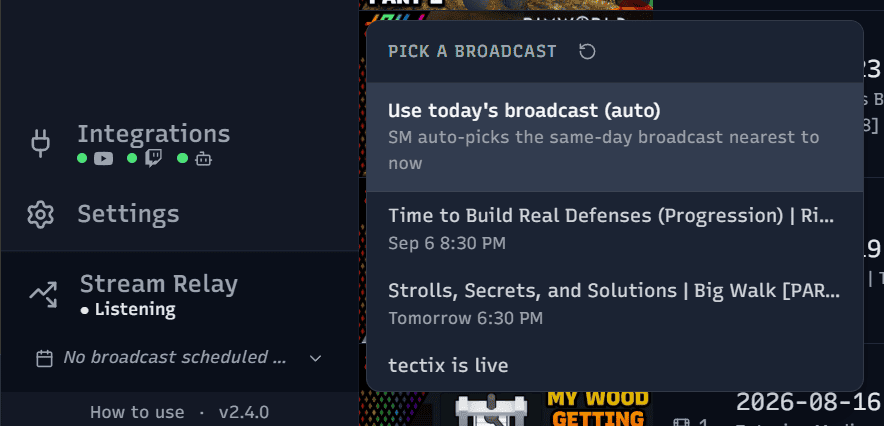
- Automatic go-live and end: the moment your encoder connects, the app binds your chosen broadcast and takes it live. When you stop, it ends the broadcast after a short grace period, so a brief encoder hiccup won't kill your stream.
- Broadcast selection: choose which upcoming broadcast to route to, or let the app pick the one closest to your start time. Live status, bitrate, and elapsed time stay visible in a sidebar widget.
- Works without a schedule: just go live with no broadcast and your stream still reaches YouTube. For spur-of-the-moment streams or when you don't want to pre-schedule a broadcast.
- Post-stream Twitch update: when a session ends, the app can roll your Twitch title and category forward to your next scheduled broadcast automatically.
- Performance: the relay passes your already-encoded stream straight to YouTube without re-encoding, so there is no second encode and no meaningful extra load on your CPU or GPU. It's just a wrapper that handles the broadcast selection for you.
- Stream Relay is not available for Twitch right now due to restrictions tied to their Enhanced Broadcasting features. Support is tentatively planned, depending on how Twitch changes it going forward.
Review and Clip in the Built-In Player
Open any stream, clip, or dropped-in video and scrub through it with thumbnail and waveform tracks. This is where you review a session and turn the best moments into shareable clips.
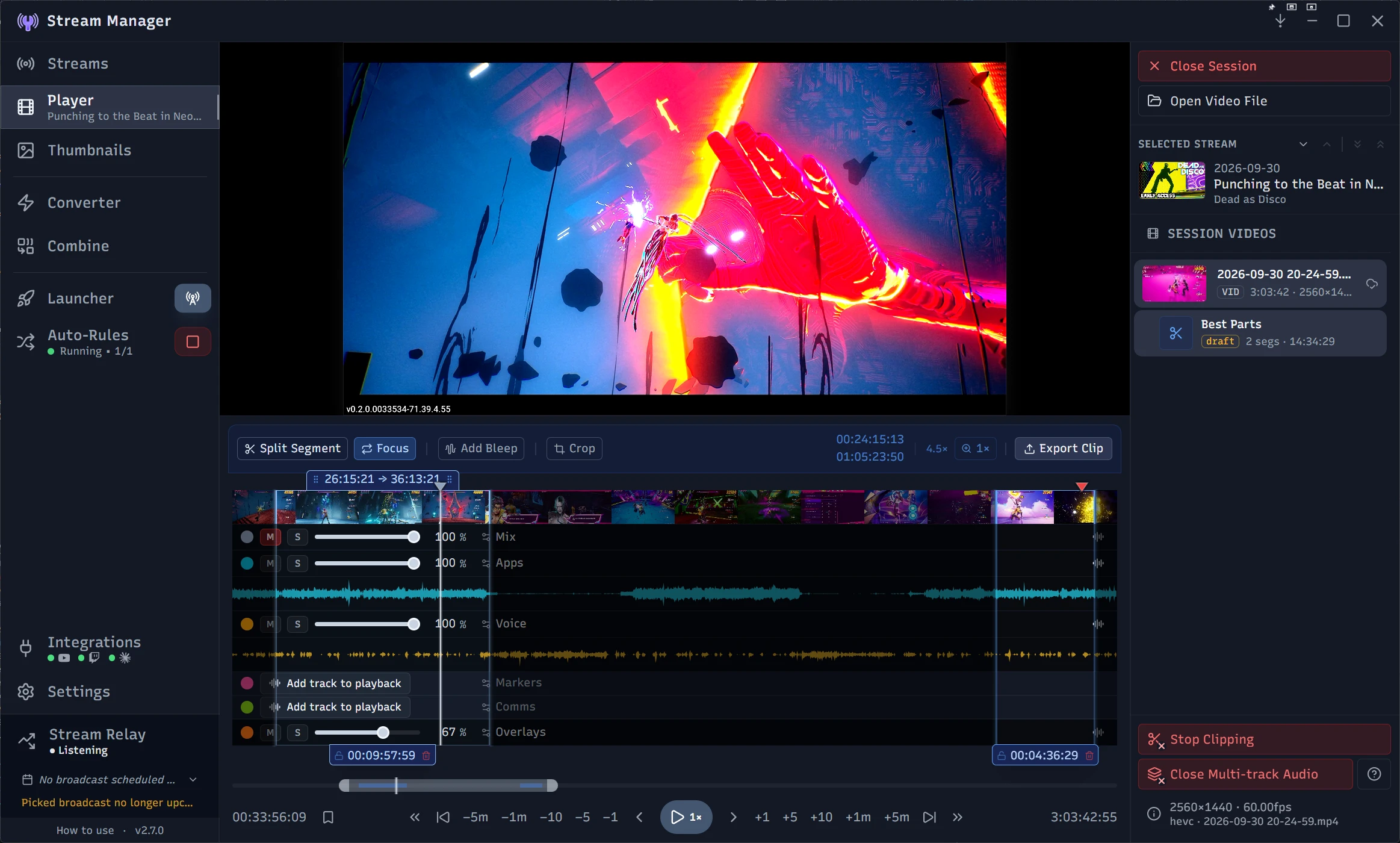
- Multi-track audio: recordings with separate game, mic, and Discord tracks get per-track mute, solo, and volume, and you choose which tracks land in the mix on export.
- Clip mode: export a finished clip straight from the player. Clips are auto-saved, stay linked to their source, and can branch into a new draft in one click, so your work stays intact.
- Shape-aware cropping: set the aspect ratio per segment to repurpose one highlight as widescreen, square, or vertical without re-editing.
- Timeline markers: chapters your streaming or editing software wrote into the file appear on the timeline automatically, including the ones OBS marks while you stream. Add your own at any point, name them, color them, and click one to jump straight there. Editing a marker that came from the file never changes the file itself.
- Bleep markers: flag regions to censor while clipping, with either a silent mute or an overlaid bleep tone.
- Pop-out for OBS: send the open video to a frameless window that OBS can capture on its own. Use rich controls to show clips live without having to use another media player app to open the file and crop out its UI.
Design Thumbnails Without Leaving the App
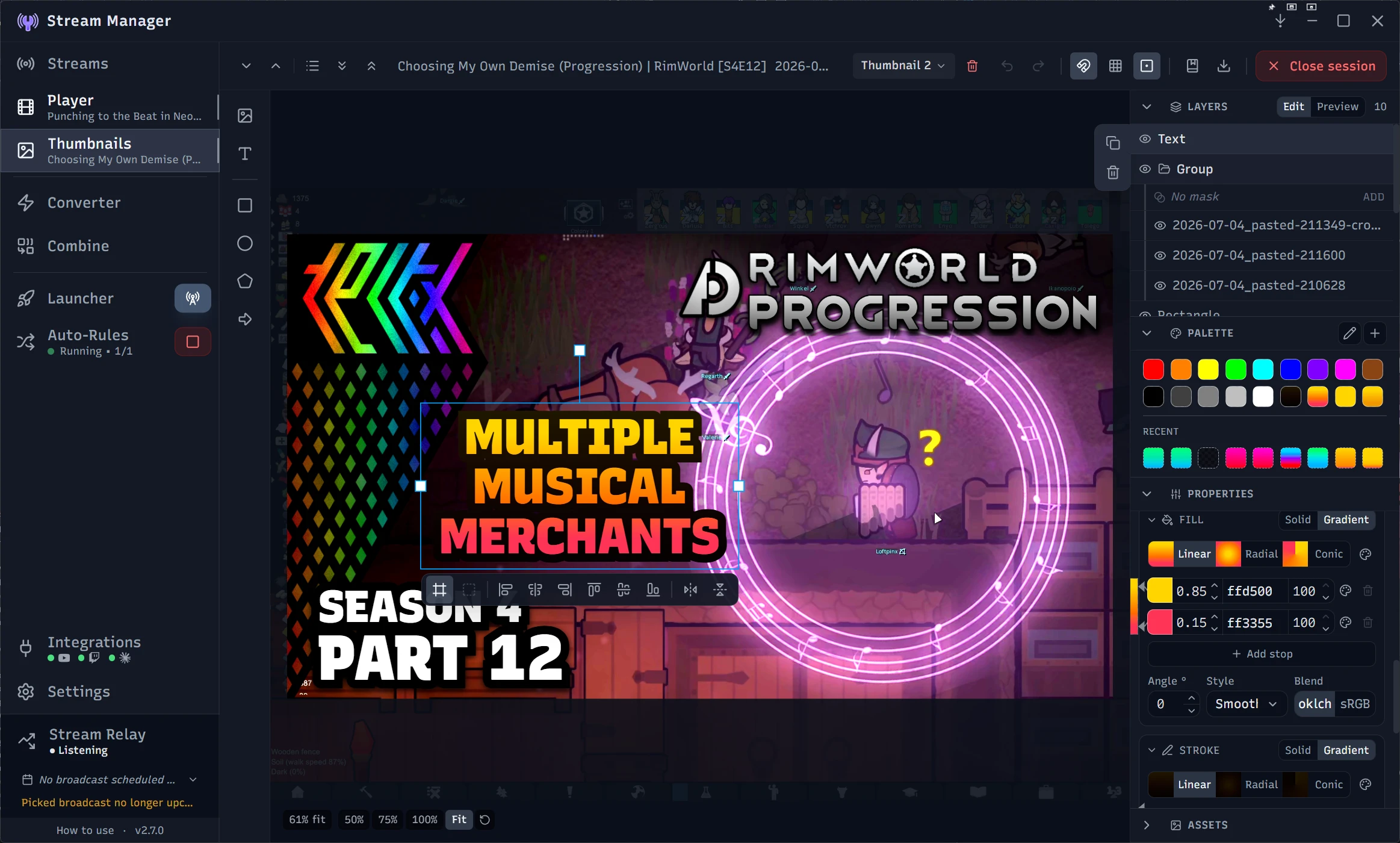
A full canvas editor for video thumbnails, built specifically for YouTube. Design templates once, reuse them across a whole series, and see how it will look on YouTube before you publish.
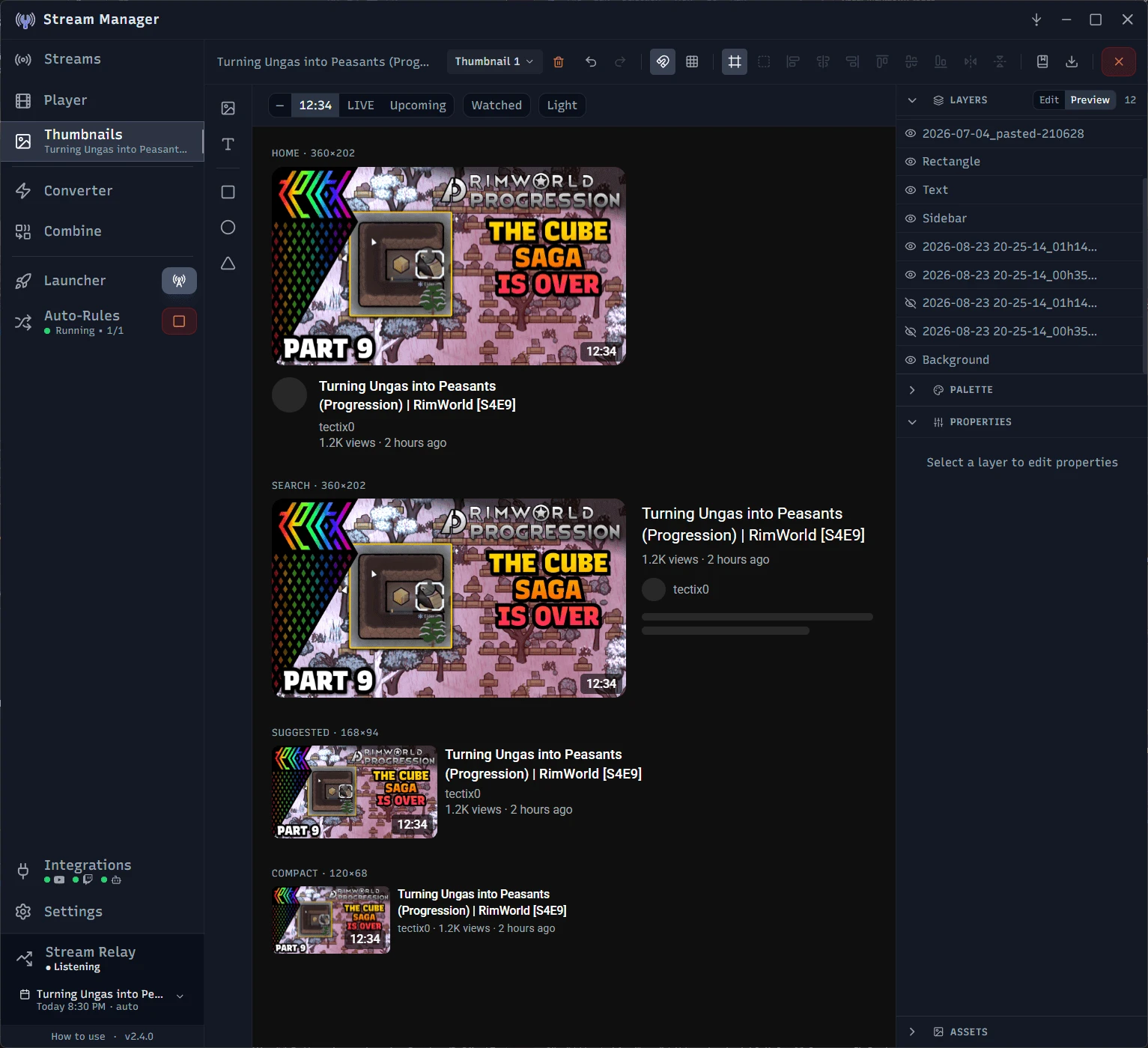
- Preview YouTube layouts: Preview your thumbnail as a home page card, search result, suggested video, and compact row. With a selection of badges, watched-progress bar, and light/dark themes. Updated live while you make changes.
- Made for YouTube: sized to YouTube's recommendation (1280x720), and only images within YouTube's file size and format limits can be set as a thumbnail.
- Targeted tools: basic layering/grouping, text, shapes, arrows, filters and effects. Simple and easy to use for fast and dynamic thumbnail creation.
- Knows your streams: grab frames from SM's player and they're ready to use immediately. Text layers can pull in the title, game, date, and episode number, so one layout stays current across an entire series.
- Reusable templates: create and pick a template when you create a new stream item to instantly get a thumbnail with your standard branding.
- Thumbnail Variants: build as many thumbnails as you like for a stream item and easily switch to the one you want as the stream's thumbnail.
- Saved colors: keep your specific solid or gradient colors in the built-in palette and apply them to shapes and text. Every thumbnail can stay on-brand without hunting down color codes.
- Thumbnail variants cannot be automatically used for YouTube's A/B tests. They must be manually done in YouTube Studio.
- The thumbnail editor is built on a heavily customized implementation of Konva, with the canvas, tools, and preview modes tailored specifically to making thumbnails for YouTube.
Convert, Remux, and Archive
Convert video files with ready-to-go or custom presets. Compress large video files for archiving, shrink them for specific upload requirements, or repackage them for another tool, all without leaving the app. Also works with external files, not limited to your Streams library.
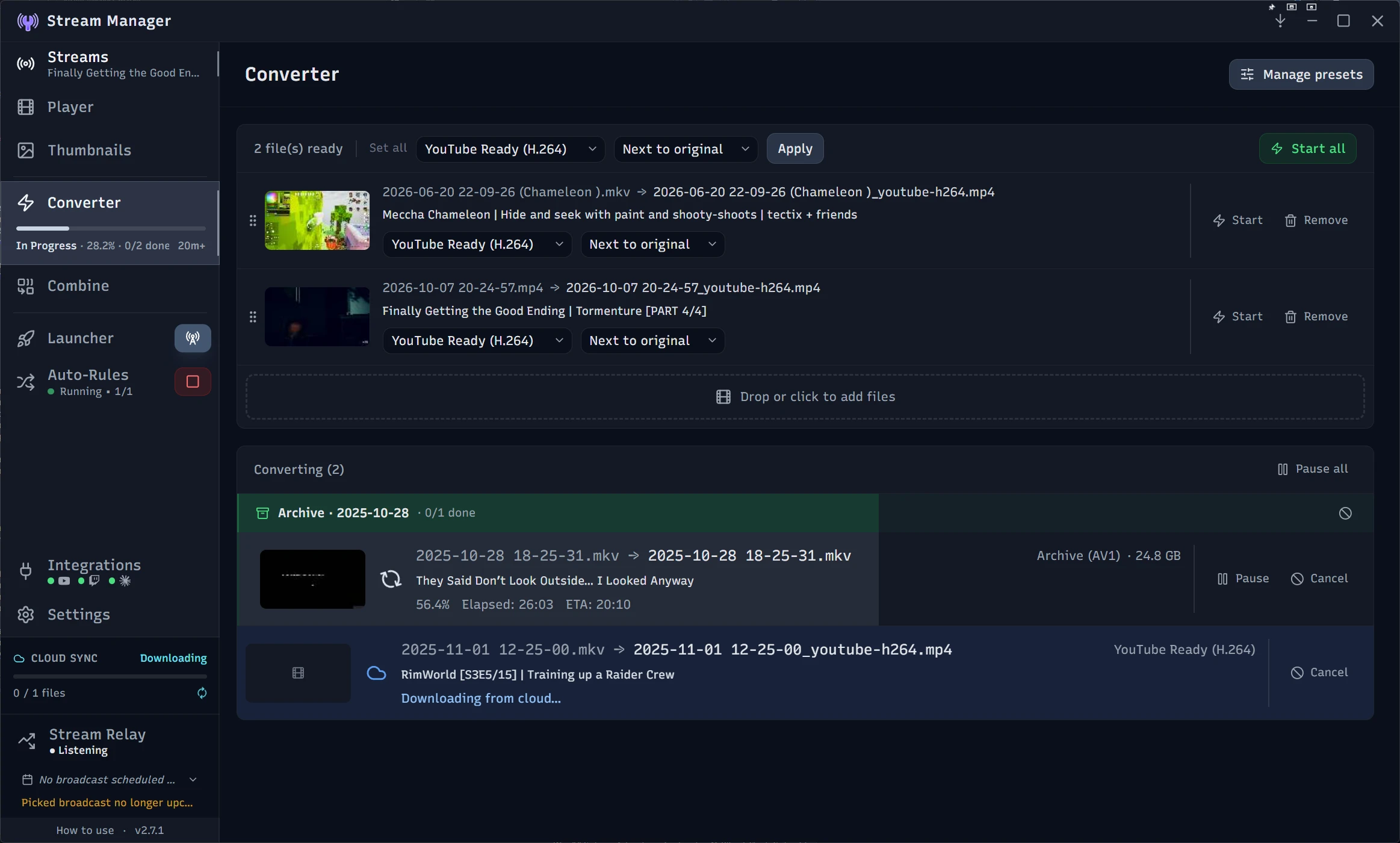
- Conversion presets: a set of presets I have found useful are included out of the box. Import your own from apps like HandBrake, or create new ones with the built-in creator (includes the ability to use custom ffmpeg options, for the adventurous).
- Archive presets: Archive (AV1) and Archive (H.265) run on your GPU when it has the right encoder and on the CPU when it does not, with the quality setting translated for whichever one is doing the work.
- Batch archiving: send whole collections of stream sessions to the converter straight from the Streams page.
- Remuxing: quickly change a video's container, like MKV to MP4, without re-encoding, similar to OBS's Remux Recordings. Works great with the Auto-Rules feature to automatically remux files as they arrive in a watched folder.
- Combine tool: for situations where your streams are broken up into separate files (length limitations, connection errors, stream software crashes) you can stitch multiple files into one with no re-encoding, auto-sorted by their recording timestamps.
- Conversion, remuxing, and combining are all powered by ffmpeg.
Automate File Handling with Auto-Rules
Set up rules that watch a folder and act on files the moment they land. Point one at your recording folder and new streams get moved, renamed, and organized into your library automatically, so you don't have to do it manually.
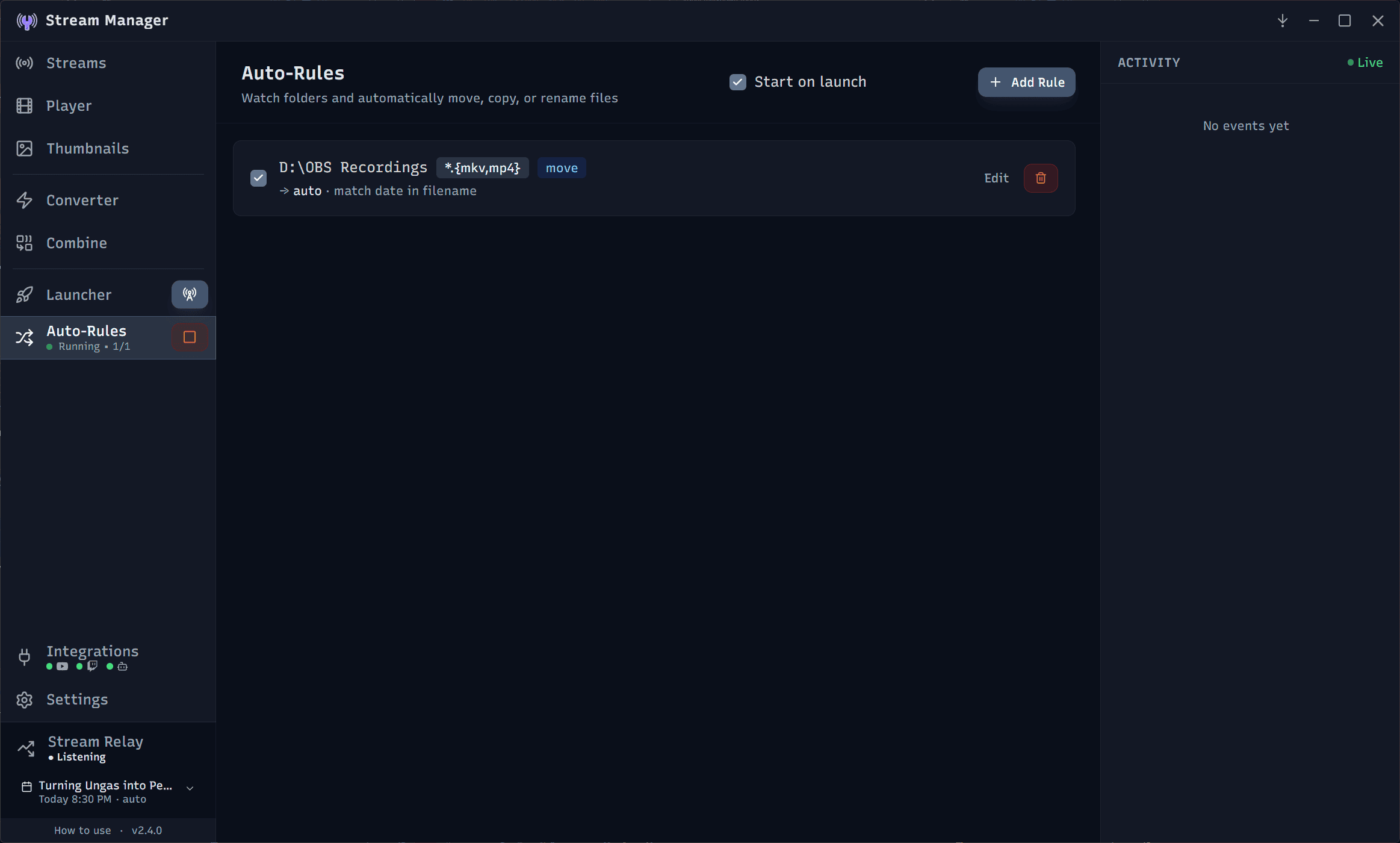
- Move, copy, rename, or convert: each rule can reorganize files, rename them to your naming scheme, or hand them straight to the converter as they arrive.
- Runs on launch: the watcher can start automatically when you open the app, so your folders stay tidy without a second thought.
Launch Your Whole Setup at Once
Bundle every app you open before going live into named groups and start them all with one click. OBS, your chat overlay, Discord, game launchers, whatever your routine needs, all up and running in a single press.
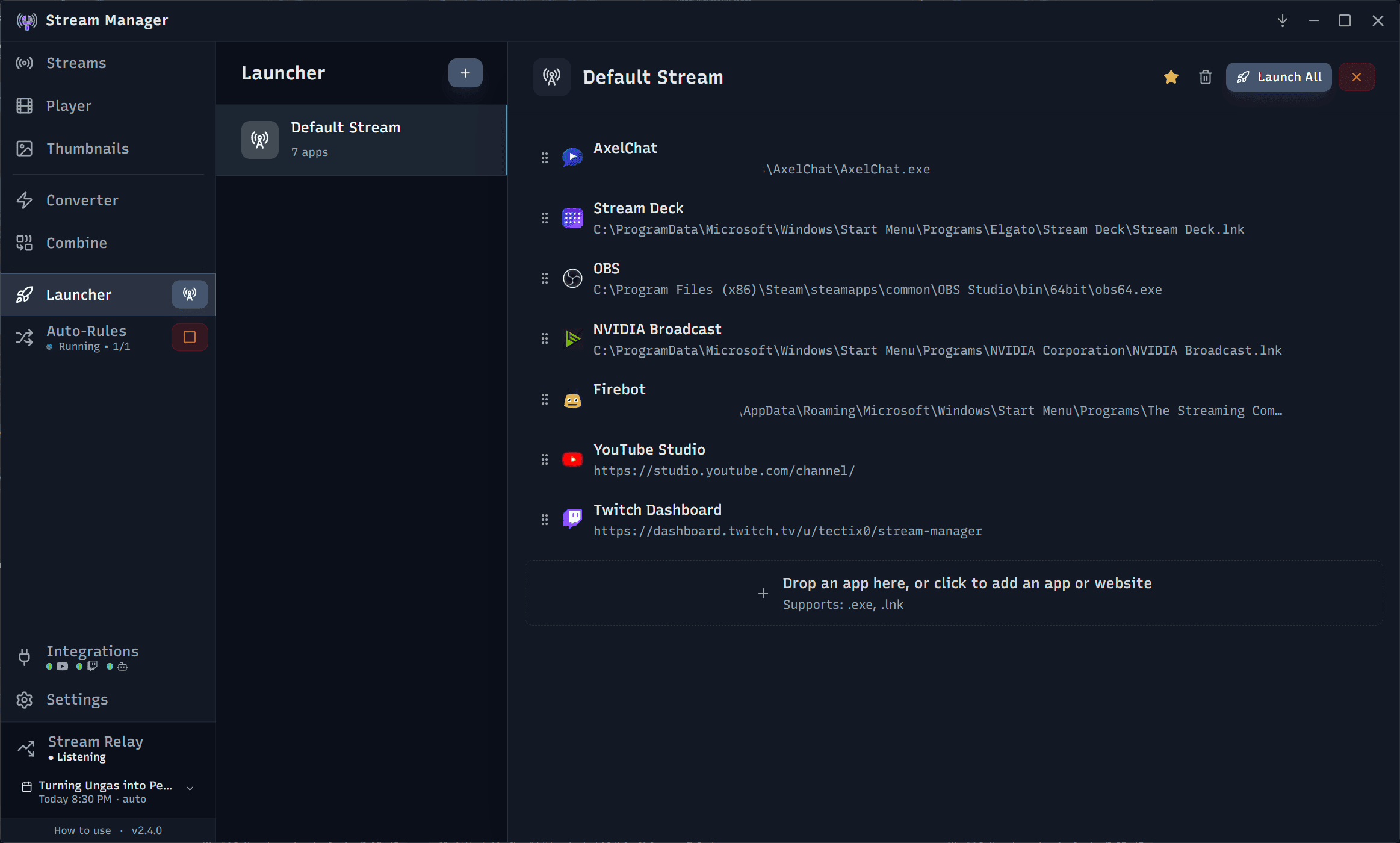
- Launch groups: organize your apps into named groups and launch a whole group at once. Add programs, shortcuts, or webpages. Use different groups for different stream setups (for instance a VR stream vs a desktop stream) and launch the right one with a single click.
- Individual launch: fire off a single app from a group without starting the rest.
- Sidebar quick launch: pin a group to the sidebar for one-click launch from anywhere.
Works With Your Cloud and NAS Storage
Stream Manager reads your files' cloud status straight from Windows, so a library that lives in a synced folder simply works. There is no account to connect and nothing to configure.
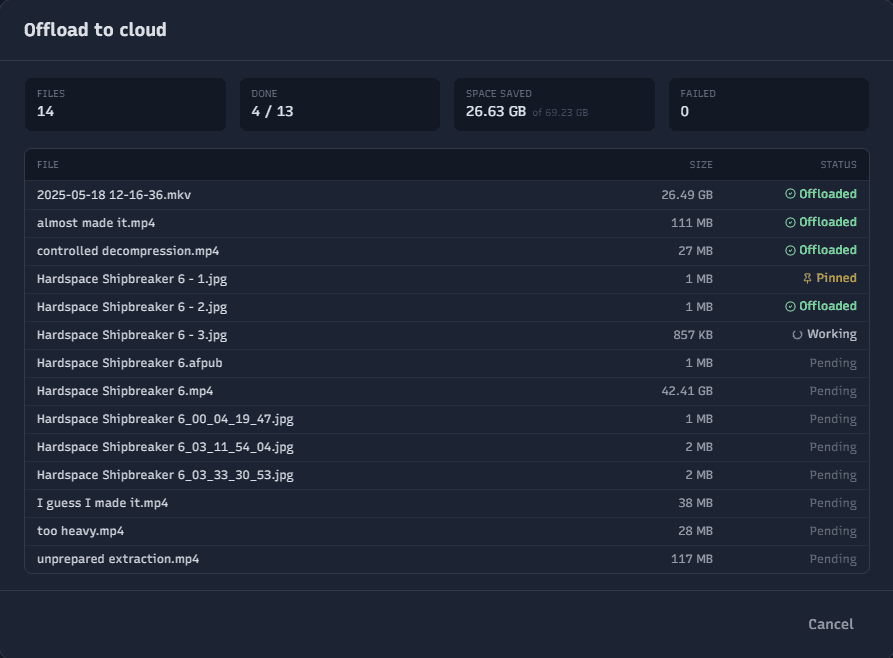
- Works with your existing sync tool: if your cloud or NAS service syncs through File Explorer using Windows' built-in support for online-only files, Stream Manager picks it up automatically. Nothing to install, connect, or set up.
- Knows what is actually on your drive: every file shows whether it is stored locally or offloaded to the cloud, along with its size, so you know what is on hand before you start working.
- Free up space or pin files local, in bulk: offload old streams that do not need to take up disk space, or pull a whole batch back down ahead of a session.
- Downloads on demand, with progress: open a stream that has been offloaded and Stream Manager fetches it through its own download queue with visible progress, instead of stalling while Windows quietly pulls the file in the background. A failed download can be retried per file.
- This works through your sync tool's Windows integration, not through any service's own API, so there are no credentials to enter and no cloud account is connected to Stream Manager. It is developed and tested against Synology Drive; other services that use the same Windows integration should behave the same way, but have not been verified.